
Content workflow: draft to publish
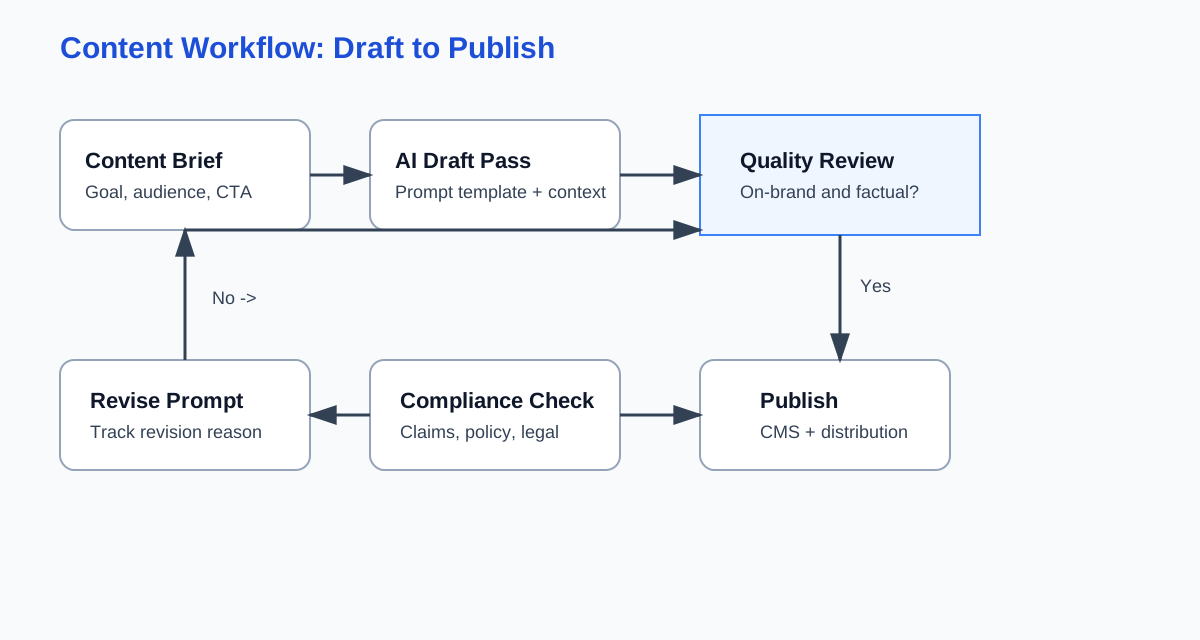
Shows how a request moves from brief to AI draft, human review, compliance checks, and final publication.
A practical implementation playbook for service businesses introducing AI across content, support, lead routing, and forecasting without a full rebuild.
Playbook version 0.1.0. This web version is the canonical working draft.
Start with stack mapping and use-case scoring before touching tools. Pilot one workflow at a time, track outcomes weekly, and scale only after quality and escalation controls are stable.
Next step
Pillar 2 — AI + automation, embedded · AI inside your ops, not bolted on.
Start with a free audit — we scope automation against your actual website and handoffs, not a rip-and-replace roadmap.
Readiness checklist
Lightweight flowcharts for content, support, and lead routing workflows. These are included in the downloadable set and can be reused in slide decks or SOP docs.
Shows how a request moves from brief to AI draft, human review, compliance checks, and final publication.
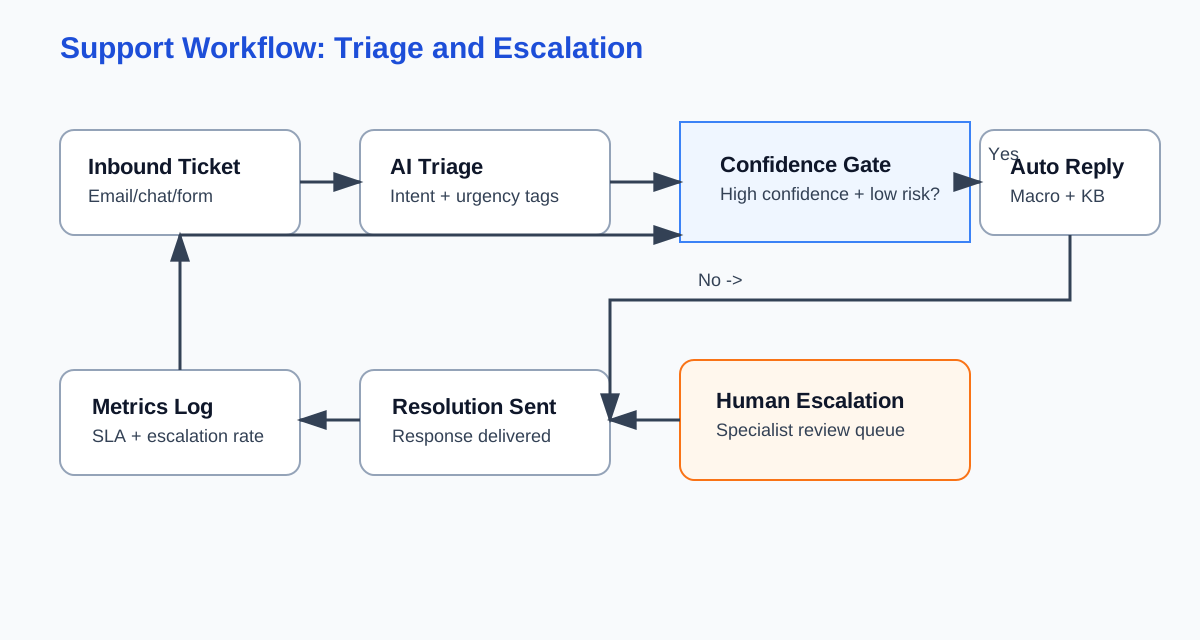
Maps confidence-gated support triage with fallback escalation for high-risk or low-confidence cases.
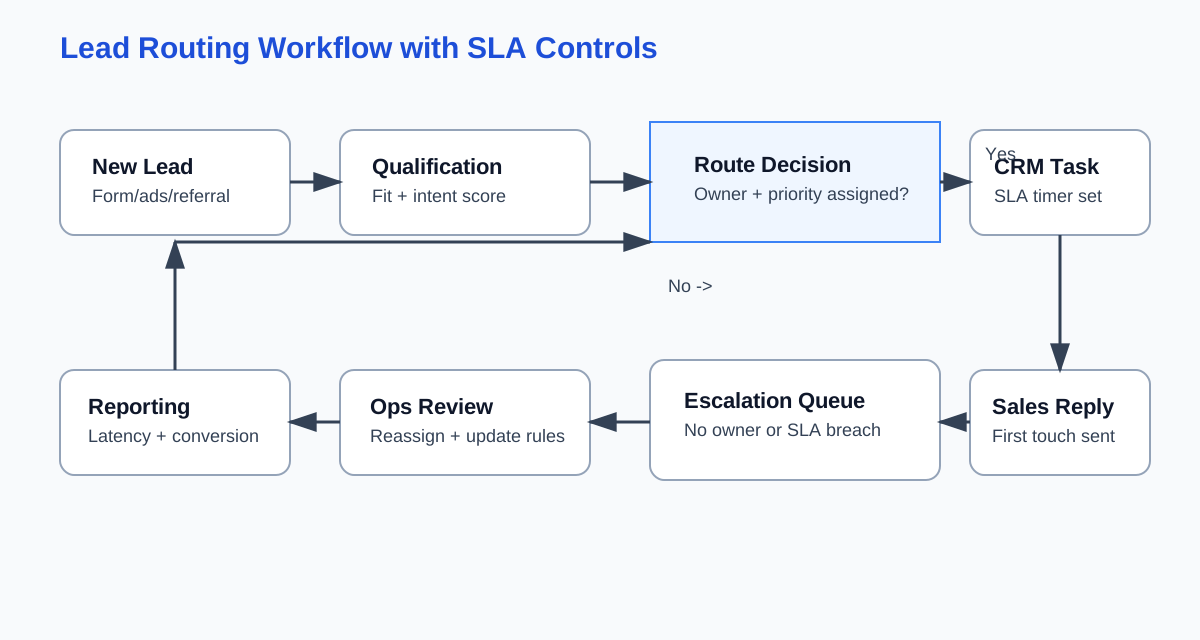
Documents qualification, owner assignment, SLA tracking, and escalation path for delayed responses.
Set practical boundaries so teams can move quickly without exposing sensitive data or automating the wrong work.
What this playbook is and is not
Safety and data hygiene
Who approves?
Operations lead with legal/compliance input when customer-sensitive data is involved.
What to log?
Approved data classes, restricted fields, and mandatory review checkpoints.
Case insert (before -> after)
Before: Team tested AI drafting on support tickets with no redaction rules and paused after exposing private notes.
After: Team added data classes and reviewer gates, then resumed with auditable prompts and no sensitive leakage.
Map where work actually happens so automation design starts from real process flow instead of tool demos.
System map
Friction inventory
Who approves?
Operations manager and functional owners (sales/support/content).
What to log?
Current-state workflow map, baseline metrics, and known system limitations.
Case insert (before -> after)
Before: Leads were qualified in three places with different criteria, creating reassignment delays and SLA misses.
After: Team centralized qualification rules in CRM and reduced first-response variance within two weeks.
Choose use cases with disciplined scoring so pilots are measurable and worth operational change effort.
Scoring model
Pilot definition
Who approves?
Founder or head of ops with workflow owner sign-off.
What to log?
Scoring table, pilot hypothesis, success metrics, rollback triggers.
Case insert (before -> after)
Before: Team launched three AI workflows at once and could not isolate what improved conversions.
After: Team sequenced pilots and linked each metric change to one intervention.
Deploy role-specific patterns with human-in-the-loop review and explicit escalation criteria.
Content workflow pattern
Support and lead routing pattern
Forecasting and ops pattern
Who approves?
Functional leaders for each workflow plus ops owner for shared standards.
What to log?
Prompt revisions, escalation volume, SLA compliance, and scenario assumptions.
Case insert (before -> after)
Before: Support team auto-sent suggested replies without confidence gating and triggered avoidable escalations.
After: Confidence thresholds and human review reduced incorrect outbound responses and improved CSAT stability.
Scale pilots safely with repeatable change management and tool-selection criteria that age well.
Rollout cadence
Vendor/model decision criteria
Who approves?
Founders and operations leadership, with finance review for recurring cost exposure.
What to log?
Decision criteria, vendor trade-offs, rollout incident log, and retraining notes.
Case insert (before -> after)
Before: Team chose a tool on demo quality, then hit integration limits after onboarding.
After: Team adopted criteria-first evaluation and selected a stack with stable CRM and inbox connectivity.